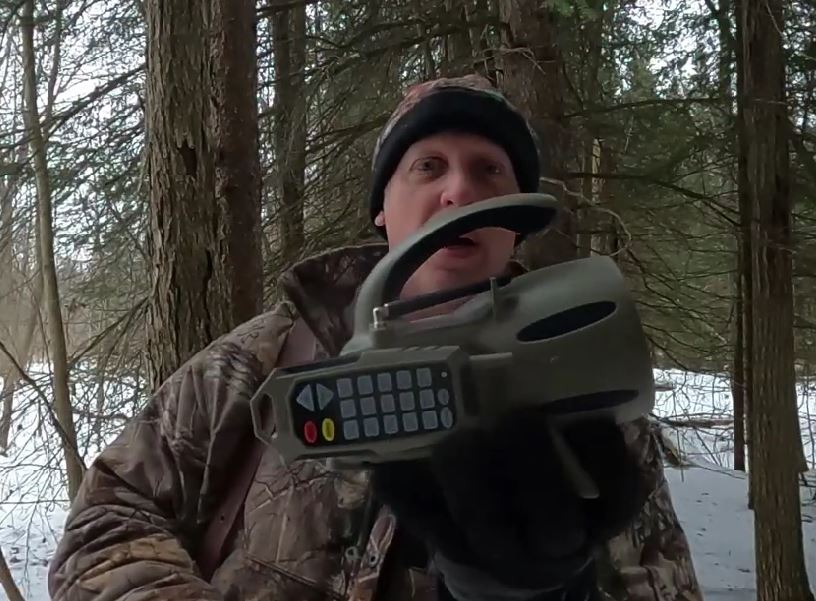
If you’re stepping into the world of electronic game calls for the first time, the ICOtec 300+ (often called the ICOtec 300) is a solid, beginner-friendly option that doesn’t overwhelm you with complexity or price. Here’s a detailed look at what it’s like to set up and use it for the first time, along with the features that stand out in the field.
First Impressions
Out of the box, the ICOtec GC300 feels lightweight but durable. It’s compact enough to toss in a hunting pack without taking up much space, yet rugged enough to handle rough terrain and cold mornings. The unit includes the caller itself and a remote control, which is one of the biggest advantages for predator hunters who want to keep movement to a minimum.
The drab greenish brown colour blends well into most natural environments, whether you’re calling in open pasture, brushy draws, or wooded edges.
Check out my YouTube video here on unboxing and setup.
Setup: Quick and Straightforward
One of the best things about the 300+ is how simple it is to get started.
1. Install the Batteries
The caller runs on 4 standard AA batteries, and the remote uses a single A23, 12V battery (commonly sourced). Installing them takes just a few minutes with a Philips screwdriver. Make sure you insert them correctly and secure the battery compartments tightly to avoid connection issues in cold weather.
2. Power On and Pair
Most units come pre-synced from the factory. After powering on both the caller and remote, they connect automatically. If pairing is needed, the instructions in the manual walk you through the process step by step. It’s simple enough that even first-time electronic call users won’t struggle.
3. Positioning in the Field
For your first setup outdoors:
- Place the caller 20–40 yards upwind or crosswind from your shooting position.
- Elevate it slightly if possible (on a small bush, rock, or mound) to improve sound projection.
- Keep the remote with you in a concealed position.
The remote range is typically sufficient for predator setups, allowing you to control sound without being right on top of the unit. In heavy cover you may want to set the call further away upwind so you are in their downwind travel path.
Sound Library and Volume Control
The ICOtec GC300+ comes preloaded with 15 high-quality sounds. These commonly include:
- Cottontail distress
- Jackrabbit distress
- Pup distress
- Various predator vocalizations
For a first-time user, 15 sounds is actually a benefit. It prevents overcomplicating your stand with too many options. You can focus on learning when and how to use each call instead of scrolling through dozens of sounds. If you are looking to use the call more in-depth then the Bluetooth feature allows you to use unlimited sounds downloaded on your phone.
The volume range is impressive for such a compact unit. It’s loud enough to carry across open fields but can also be turned down low for close-range setups in tighter cover. Starting at a lower volume and gradually increasing it is usually the best approach for starting every call sequence.
Remote Features
The remote is one of the highlights of the GC300+.
- Sound selection buttons: Direct access to sounds without complicated menus.
- Mute/Pause button: Instantly stops sound when an animal appears unexpectedly.
- Volume up/down controls: Quick adjustments without fumbling.
- Lighted Keys: For in areas where night hunting is allowed
For first-time use, the remote is intuitive. Large, clearly marked buttons make it easy to operate—even with gloves on during cold-weather hunts.
Field Performance on First Use
On its first outing, what stands out most is the clarity of the sound. Even at higher volumes, the speaker maintains realistic distress tones without distortion. That realism is critical for predator calling, where unnatural audio can make wary animals hang up.
Battery life is solid for typical stands. As with any electronic device, carrying spare batteries is a smart move, especially during longer hunts or freezing temperatures. I prefer to use lithium ion rechargeable batteries as they perform better in the cold.
The lightweight design makes moving between stands easy. If you’re running multiple setups in a morning, you’ll appreciate not hauling heavy gear.
Practical Tips for Beginners
If this is your first time using an electronic call like the ICOtec 300+, keep these tips in mind:
- Don’t overcall: Let the sound play naturally. Use short calling sequences with multiple pauses.
- Watch the wind: Always set up with wind direction in mind. Predators rely heavily on scent.
- Keep movement minimal: Use the remote to your advantage.
- Start simple: Stick to one or two distress sounds until you gain confidence.
In Conclusion:
For hunters new to electronic calls, the ICOtec 300+ offers an excellent balance of simplicity and performance. Setup is fast, the remote is user-friendly, and the sound quality is more than capable of producing real-world results.
It may not have the massive sound libraries or advanced programming features of higher-end units, but that’s part of its charm. For a first-time user, fewer complications mean more focus on stand selection, wind, and shot opportunities. If looking to expand the call then Bluetooth is available.
If you’re looking to transition from mouth calls to electronic calling—or just want an affordable, dependable unit to start with—the ICOtec 300+ is a strong introduction to the world of predator hunting technology.
Pick up Your call here - https://amzn.to/4sf3kIh